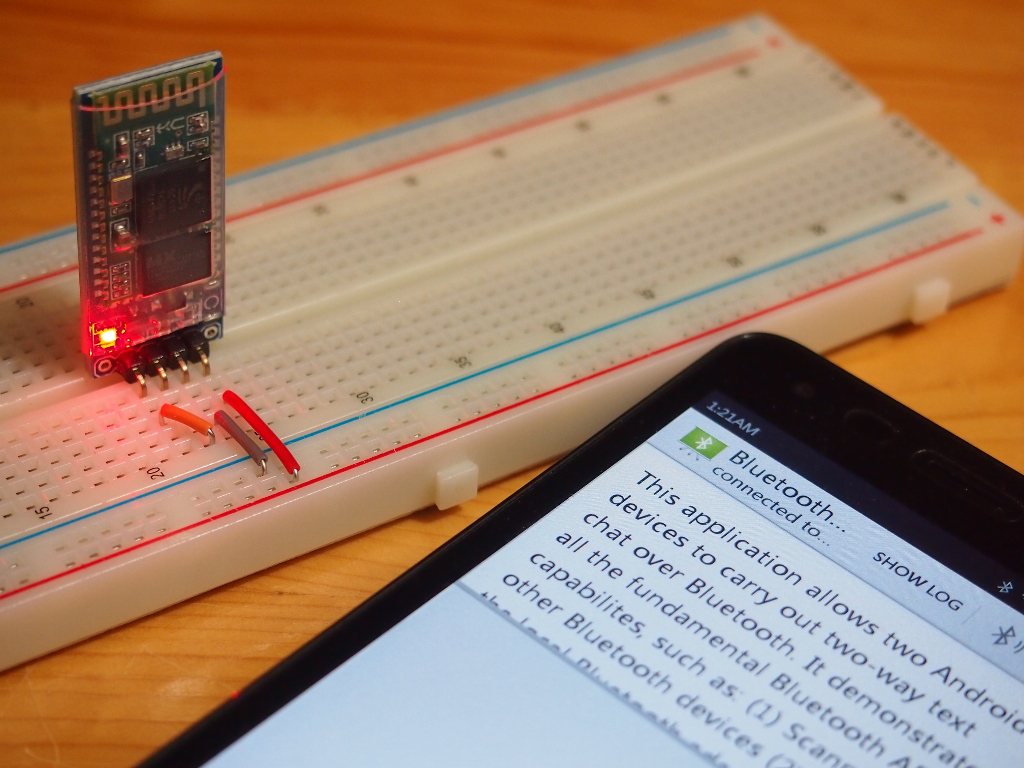
We need a FTDI USB-to-Serial adapter to connect PC/USB and HC-05 Bluetooth, and use Arduino IDE's Serial Monitor as terminal, to talk with Android running modified BluetoothChat example.
This video show how to import BluetoothChat example in Android Studio, and edit BluetoothChatService.java to change MY_UUID_SECURE to UUID.fromString("00001101-0000-1000-8000-00805F9B34FB").
Update@2015-11-11:
In the above code of MainActivity.java, in run() of ThreadConnected, if Connection lost (such as Raspberry Pi or HC-06 power OFF), the thread will still keep running.
So have to cancel the thread and disable the FloatingActionButton. Modify run() of ThreadConnected.
        @Override
        public void run() {
            byte[] buffer = new byte[1024];
            int bytes;

            String strRx = "";

            while (running) {
                try {
                    bytes = connectedInputStream.read(buffer);
                    final String strReceived = new String(buffer, 0, bytes);
                    final String strByteCnt = String.valueOf(bytes) + " bytes received.\n";

                    runOnUiThread(new Runnable(){

                        @Override
                        public void run() {
                            body.append(strReceived);
                        }});

                } catch (IOException e) {
                    // TODO Auto-generated catch block
                    e.printStackTrace();

                    cancel();

                    final String msgConnectionLost = "Connection lost:\n"
                            + e.getMessage();
                    runOnUiThread(new Runnable(){

                        @Override
                        public void run() {
                            Toast.makeText(MainActivity.this, msgConnectionLost, Toast.LENGTH_LONG).show();

                            fab.setEnabled(false);
                            fab.setVisibility(FloatingActionButton.GONE);

                        }});
                }
            }
        }
This post show how to connect Windows 10 to HC-06 Bluetooth Module.
Actually it's a loopback connection:
PuTTY Serial connect to Bluetooth Outgoing port -> (Bluetooth) -> HC-06 -> FT232RL -> (USB) -> Arduino IDE Serial Monitot.
This video show how to pair HC-06 on Windows 10, and try the loopback test.
After more test, I found that the first byte not lost. Because the byte stream sent from Arduino not in sync with Android side, and the bytes may be separated in different slot received in Android ThreadConnected, and the old slot covered by the new slot.
To show it, I modify it not to clear the TextView.
MainActivity.java
/*
Android Example to connect to and communicate with Bluetooth
In this exercise, the target is a Arduino Due + HC-06 (Bluetooth Module)

Ref:
- Make BlueTooth connection between Android devices
http://android-er.blogspot.com/2014/12/make-bluetooth-connection-between.html
- Bluetooth communication between Android devices
http://android-er.blogspot.com/2014/12/bluetooth-communication-between-android.html
 */
package com.example.androidbtcontrol;

import android.app.Activity;
import android.bluetooth.BluetoothAdapter;
import android.bluetooth.BluetoothDevice;
import android.bluetooth.BluetoothSocket;
import android.content.Intent;
import android.content.pm.PackageManager;
import android.os.Bundle;
import android.support.v7.app.ActionBarActivity;
import android.view.View;
import android.widget.AdapterView;
import android.widget.ArrayAdapter;
import android.widget.Button;
import android.widget.EditText;
import android.widget.LinearLayout;
import android.widget.ListView;
import android.widget.TextView;
import android.widget.Toast;

import java.io.IOException;
import java.io.InputStream;
import java.io.OutputStream;
import java.util.ArrayList;
import java.util.Set;
import java.util.UUID;

public class MainActivity extends ActionBarActivity {

    private static final int REQUEST_ENABLE_BT = 1;

    BluetoothAdapter bluetoothAdapter;

    ArrayList<BluetoothDevice> pairedDeviceArrayList;

    TextView textInfo, textStatus, textByteCnt;
    ListView listViewPairedDevice;
    LinearLayout inputPane;
    EditText inputField;
    Button btnSend, btnClear;

    ArrayAdapter<BluetoothDevice> pairedDeviceAdapter;
    private UUID myUUID;
    private final String UUID_STRING_WELL_KNOWN_SPP =
        "00001101-0000-1000-8000-00805F9B34FB";

    ThreadConnectBTdevice myThreadConnectBTdevice;
    ThreadConnected myThreadConnected;

    @Override
    protected void onCreate(Bundle savedInstanceState) {
        super.onCreate(savedInstanceState);
        setContentView(R.layout.activity_main);

        textInfo = (TextView)findViewById(R.id.info);
        textStatus = (TextView)findViewById(R.id.status);
        textByteCnt = (TextView)findViewById(R.id.textbyteCnt);
        listViewPairedDevice = (ListView)findViewById(R.id.pairedlist);

        inputPane = (LinearLayout)findViewById(R.id.inputpane);
        inputField = (EditText)findViewById(R.id.input);
        btnSend = (Button)findViewById(R.id.send);
        btnSend.setOnClickListener(new View.OnClickListener(){

            @Override
            public void onClick(View v) {
                if(myThreadConnected!=null){
                    byte[] bytesToSend = inputField.getText().toString().getBytes();
                    myThreadConnected.write(bytesToSend);
                    byte[] NewLine = "\n".getBytes();
                    myThreadConnected.write(NewLine);
                }
            }});

        btnClear = (Button)findViewById(R.id.clear);
        btnClear.setOnClickListener(new View.OnClickListener() {
            @Override
            public void onClick(View v) {
                textStatus.setText("");
                textByteCnt.setText("");
            }
        });

        if (!getPackageManager().hasSystemFeature(PackageManager.FEATURE_BLUETOOTH)){
            Toast.makeText(this,
                    "FEATURE_BLUETOOTH NOT support",
                    Toast.LENGTH_LONG).show();
            finish();
            return;
        }

        //using the well-known SPP UUID
        myUUID = UUID.fromString(UUID_STRING_WELL_KNOWN_SPP);

        bluetoothAdapter = BluetoothAdapter.getDefaultAdapter();
        if (bluetoothAdapter == null) {
            Toast.makeText(this,
                    "Bluetooth is not supported on this hardware platform",
                    Toast.LENGTH_LONG).show();
            finish();
            return;
        }

        String stInfo = bluetoothAdapter.getName() + "\n" +
                bluetoothAdapter.getAddress();
        textInfo.setText(stInfo);
    }

    @Override
    protected void onStart() {
        super.onStart();

        //Turn ON BlueTooth if it is OFF
        if (!bluetoothAdapter.isEnabled()) {
            Intent enableIntent = new Intent(BluetoothAdapter.ACTION_REQUEST_ENABLE);
            startActivityForResult(enableIntent, REQUEST_ENABLE_BT);
        }

        setup();
    }

    private void setup() {
        Set<BluetoothDevice> pairedDevices = bluetoothAdapter.getBondedDevices();
        if (pairedDevices.size() > 0) {
            pairedDeviceArrayList = new ArrayList<BluetoothDevice>();

            for (BluetoothDevice device : pairedDevices) {
                pairedDeviceArrayList.add(device);
            }

            pairedDeviceAdapter = new ArrayAdapter<BluetoothDevice>(this,
                    android.R.layout.simple_list_item_1, pairedDeviceArrayList);
            listViewPairedDevice.setAdapter(pairedDeviceAdapter);

            listViewPairedDevice.setOnItemClickListener(new AdapterView.OnItemClickListener() {

                @Override
                public void onItemClick(AdapterView<?> parent, View view,
                                        int position, long id) {
                    BluetoothDevice device =
                            (BluetoothDevice) parent.getItemAtPosition(position);
                    Toast.makeText(MainActivity.this,
                            "Name: " + device.getName() + "\n"
                                    + "Address: " + device.getAddress() + "\n"
                                    + "BondState: " + device.getBondState() + "\n"
                                    + "BluetoothClass: " + device.getBluetoothClass() + "\n"
                                    + "Class: " + device.getClass(),
                            Toast.LENGTH_LONG).show();

                    textStatus.setText("start ThreadConnectBTdevice");
                    myThreadConnectBTdevice = new ThreadConnectBTdevice(device);
                    myThreadConnectBTdevice.start();
                }
            });
        }
    }

    @Override
    protected void onDestroy() {
        super.onDestroy();

        if(myThreadConnectBTdevice!=null){
            myThreadConnectBTdevice.cancel();
        }
    }

    @Override
    protected void onActivityResult(int requestCode, int resultCode, Intent data) {
        if(requestCode==REQUEST_ENABLE_BT){
            if(resultCode == Activity.RESULT_OK){
                setup();
            }else{
                Toast.makeText(this,
                        "BlueTooth NOT enabled",
                        Toast.LENGTH_SHORT).show();
                finish();
            }
        }
    }

    //Called in ThreadConnectBTdevice once connect successed
    //to start ThreadConnected
    private void startThreadConnected(BluetoothSocket socket){

        myThreadConnected = new ThreadConnected(socket);
        myThreadConnected.start();
    }

    /*
    ThreadConnectBTdevice:
    Background Thread to handle BlueTooth connecting
    */
    private class ThreadConnectBTdevice extends Thread {

        private BluetoothSocket bluetoothSocket = null;
        private final BluetoothDevice bluetoothDevice;


        private ThreadConnectBTdevice(BluetoothDevice device) {
            bluetoothDevice = device;

            try {
                bluetoothSocket = device.createRfcommSocketToServiceRecord(myUUID);
                textStatus.setText("bluetoothSocket: \n" + bluetoothSocket);
            } catch (IOException e) {
                // TODO Auto-generated catch block
                e.printStackTrace();
            }
        }

        @Override
        public void run() {
            boolean success = false;
            try {
                bluetoothSocket.connect();
                success = true;
            } catch (IOException e) {
                e.printStackTrace();

                final String eMessage = e.getMessage();
                runOnUiThread(new Runnable() {

                    @Override
                    public void run() {
                        textStatus.setText("something wrong bluetoothSocket.connect(): \n" + eMessage);
                    }
                });

                try {
                    bluetoothSocket.close();
                } catch (IOException e1) {
                    // TODO Auto-generated catch block
                    e1.printStackTrace();
                }
            }

            if(success){
                //connect successful
                final String msgconnected = "connect successful:\n"
                        + "BluetoothSocket: " + bluetoothSocket + "\n"
                        + "BluetoothDevice: " + bluetoothDevice;

                runOnUiThread(new Runnable() {

                    @Override
                    public void run() {
                        textStatus.setText("");
                        textByteCnt.setText("");
                        Toast.makeText(MainActivity.this, msgconnected, Toast.LENGTH_LONG).show();

                        listViewPairedDevice.setVisibility(View.GONE);
                        inputPane.setVisibility(View.VISIBLE);
                    }
                });

                startThreadConnected(bluetoothSocket);

            }else{
                //fail
            }
        }

        public void cancel() {

            Toast.makeText(getApplicationContext(),
                    "close bluetoothSocket",
                    Toast.LENGTH_LONG).show();

            try {
                bluetoothSocket.close();
            } catch (IOException e) {
                // TODO Auto-generated catch block
                e.printStackTrace();
            }

        }

    }

    /*
    ThreadConnected:
    Background Thread to handle Bluetooth data communication
    after connected
     */
    private class ThreadConnected extends Thread {
        private final BluetoothSocket connectedBluetoothSocket;
        private final InputStream connectedInputStream;
        private final OutputStream connectedOutputStream;

        public ThreadConnected(BluetoothSocket socket) {
            connectedBluetoothSocket = socket;
            InputStream in = null;
            OutputStream out = null;

            try {
                in = socket.getInputStream();
                out = socket.getOutputStream();
            } catch (IOException e) {
                // TODO Auto-generated catch block
                e.printStackTrace();
            }

            connectedInputStream = in;
            connectedOutputStream = out;
        }

        @Override
        public void run() {
            byte[] buffer = new byte[1024];
            int bytes;

            String strRx = "";

            while (true) {
                try {
                    bytes = connectedInputStream.read(buffer);
                    final String strReceived = new String(buffer, 0, bytes);
                    final String strByteCnt = String.valueOf(bytes) + " bytes received.\n";

                    runOnUiThread(new Runnable(){

                        @Override
                        public void run() {
                            textStatus.append(strReceived);
                            textByteCnt.append(strByteCnt);
                        }});

                } catch (IOException e) {
                    // TODO Auto-generated catch block
                    e.printStackTrace();

                    final String msgConnectionLost = "Connection lost:\n"
                            + e.getMessage();
                    runOnUiThread(new Runnable(){

                        @Override
                        public void run() {
                            textStatus.setText(msgConnectionLost);
                        }});
                }
            }
        }

        public void write(byte[] buffer) {
            try {
                connectedOutputStream.write(buffer);
            } catch (IOException e) {
                // TODO Auto-generated catch block
                e.printStackTrace();
            }
        }

        public void cancel() {
            try {
                connectedBluetoothSocket.close();
            } catch (IOException e) {
                // TODO Auto-generated catch block
                e.printStackTrace();
            }
        }
    }

}
Previous exercise "Android example to communicate with Bluetooth device, HC-06 Bluetooth Module" show how to send string. Here we implement our command format, such that we can use SeekBar on Android to control brightness of the Arduino Due on-board LED (pin 13), via Bluetooth to HC-06 Bluetooth Module.
Android Side:
com.example.androidbtcontrol.MainActivity.java
/*
Android Example to connect to and communicate with Bluetooth
In this exercise, the target is a Arduino Due + HC-06 (Bluetooth Module)

 */
package com.example.androidbtcontrol;

import android.app.Activity;
import android.bluetooth.BluetoothAdapter;
import android.bluetooth.BluetoothDevice;
import android.bluetooth.BluetoothSocket;
import android.content.Intent;
import android.content.pm.PackageManager;
import android.os.Bundle;
import android.support.v7.app.ActionBarActivity;
import android.view.View;
import android.widget.AdapterView;
import android.widget.ArrayAdapter;
import android.widget.Button;
import android.widget.EditText;
import android.widget.LinearLayout;
import android.widget.ListView;
import android.widget.ProgressBar;
import android.widget.SeekBar;
import android.widget.TextView;
import android.widget.Toast;

import java.io.IOException;
import java.io.InputStream;
import java.io.OutputStream;
import java.util.ArrayList;
import java.util.Set;
import java.util.UUID;


public class MainActivity extends ActionBarActivity {

    private static final int REQUEST_ENABLE_BT = 1;

    BluetoothAdapter bluetoothAdapter;

    ArrayList<BluetoothDevice> pairedDeviceArrayList;

    TextView textInfo, textStatus;
    ListView listViewPairedDevice;
    LinearLayout inputPane;

    SeekBar barAnalogOut;

    ArrayAdapter<BluetoothDevice> pairedDeviceAdapter;
    private UUID myUUID;
    private final String UUID_STRING_WELL_KNOWN_SPP =
        "00001101-0000-1000-8000-00805F9B34FB";

    ThreadConnectBTdevice myThreadConnectBTdevice;
    ThreadConnected myThreadConnected;

    @Override
    protected void onCreate(Bundle savedInstanceState) {
        super.onCreate(savedInstanceState);
        setContentView(R.layout.activity_main);

        textInfo = (TextView)findViewById(R.id.info);
        textStatus = (TextView)findViewById(R.id.status);
        listViewPairedDevice = (ListView)findViewById(R.id.pairedlist);

        inputPane = (LinearLayout)findViewById(R.id.inputpane);

        if (!getPackageManager().hasSystemFeature(PackageManager.FEATURE_BLUETOOTH)){
            Toast.makeText(this,
                    "FEATURE_BLUETOOTH NOT support",
                    Toast.LENGTH_LONG).show();
            finish();
            return;
        }

        //using the well-known SPP UUID
        myUUID = UUID.fromString(UUID_STRING_WELL_KNOWN_SPP);

        bluetoothAdapter = BluetoothAdapter.getDefaultAdapter();
        if (bluetoothAdapter == null) {
            Toast.makeText(this,
                    "Bluetooth is not supported on this hardware platform",
                    Toast.LENGTH_LONG).show();
            finish();
            return;
        }

        String stInfo = bluetoothAdapter.getName() + "\n" +
                bluetoothAdapter.getAddress();
        textInfo.setText(stInfo);

        barAnalogOut = (SeekBar)findViewById(R.id.analogOut);
        barAnalogOut.setOnSeekBarChangeListener(OnAnalogOutChangeListener);

    }

    SeekBar.OnSeekBarChangeListener OnAnalogOutChangeListener =
            new SeekBar.OnSeekBarChangeListener(){
                @Override
                public void onProgressChanged(SeekBar seekBar, int progress, boolean fromUser) {
                    //will generate too much data sent!
                    //SendAnalogOut(progress);
                }

                @Override
                public void onStartTrackingTouch(SeekBar seekBar) {

                }

                @Override
                public void onStopTrackingTouch(SeekBar seekBar) {
                    SendAnalogOut(seekBar.getProgress());
                }
            };

    private final byte SYNC_BYTE = (byte) 0xAA;
    private final byte LENGTH_ANALOG = (byte) 3;
    private final byte CMD_ANALOG = (byte) 1;

    private void SendAnalogOut(int val){
        byte[] bytesToSend = {SYNC_BYTE, LENGTH_ANALOG, CMD_ANALOG, (byte) val};
        myThreadConnected.write(bytesToSend);
    }

    @Override
    protected void onStart() {
        super.onStart();

        //Turn ON BlueTooth if it is OFF
        if (!bluetoothAdapter.isEnabled()) {
            Intent enableIntent = new Intent(BluetoothAdapter.ACTION_REQUEST_ENABLE);
            startActivityForResult(enableIntent, REQUEST_ENABLE_BT);
        }

        setup();
    }

    private void setup() {
        Set<BluetoothDevice> pairedDevices = bluetoothAdapter.getBondedDevices();
        if (pairedDevices.size() > 0) {
            pairedDeviceArrayList = new ArrayList<BluetoothDevice>();

            for (BluetoothDevice device : pairedDevices) {
                pairedDeviceArrayList.add(device);
            }

            pairedDeviceAdapter = new ArrayAdapter<BluetoothDevice>(this,
                    android.R.layout.simple_list_item_1, pairedDeviceArrayList);
            listViewPairedDevice.setAdapter(pairedDeviceAdapter);

            listViewPairedDevice.setOnItemClickListener(new AdapterView.OnItemClickListener() {

                @Override
                public void onItemClick(AdapterView<?> parent, View view,
                                        int position, long id) {
                    BluetoothDevice device =
                            (BluetoothDevice) parent.getItemAtPosition(position);
                    Toast.makeText(MainActivity.this,
                            "Name: " + device.getName() + "\n"
                                    + "Address: " + device.getAddress() + "\n"
                                    + "BondState: " + device.getBondState() + "\n"
                                    + "BluetoothClass: " + device.getBluetoothClass() + "\n"
                                    + "Class: " + device.getClass(),
                            Toast.LENGTH_LONG).show();

                    textStatus.setText("start ThreadConnectBTdevice");
                    myThreadConnectBTdevice = new ThreadConnectBTdevice(device);
                    myThreadConnectBTdevice.start();
                }
            });
        }
    }

    @Override
    protected void onDestroy() {
        super.onDestroy();

        if(myThreadConnectBTdevice!=null){
            myThreadConnectBTdevice.cancel();
        }
    }

    @Override
    protected void onActivityResult(int requestCode, int resultCode, Intent data) {
        if(requestCode==REQUEST_ENABLE_BT){
            if(resultCode == Activity.RESULT_OK){
                setup();
            }else{
                Toast.makeText(this,
                        "BlueTooth NOT enabled",
                        Toast.LENGTH_SHORT).show();
                finish();
            }
        }
    }

    //Called in ThreadConnectBTdevice once connect successed
    //to start ThreadConnected
    private void startThreadConnected(BluetoothSocket socket){

        myThreadConnected = new ThreadConnected(socket);
        myThreadConnected.start();
    }

    /*
    ThreadConnectBTdevice:
    Background Thread to handle BlueTooth connecting
    */
    private class ThreadConnectBTdevice extends Thread {

        private BluetoothSocket bluetoothSocket = null;
        private final BluetoothDevice bluetoothDevice;


        private ThreadConnectBTdevice(BluetoothDevice device) {
            bluetoothDevice = device;

            try {
                bluetoothSocket = device.createRfcommSocketToServiceRecord(myUUID);
                textStatus.setText("bluetoothSocket: \n" + bluetoothSocket);
            } catch (IOException e) {
                // TODO Auto-generated catch block
                e.printStackTrace();
            }
        }

        @Override
        public void run() {
            boolean success = false;
            try {
                bluetoothSocket.connect();
                success = true;
            } catch (IOException e) {
                e.printStackTrace();

                final String eMessage = e.getMessage();
                runOnUiThread(new Runnable() {

                    @Override
                    public void run() {
                        textStatus.setText("something wrong bluetoothSocket.connect(): \n" + eMessage);
                    }
                });

                try {
                    bluetoothSocket.close();
                } catch (IOException e1) {
                    // TODO Auto-generated catch block
                    e1.printStackTrace();
                }
            }

            if(success){
                //connect successful
                final String msgconnected = "connect successful:\n"
                        + "BluetoothSocket: " + bluetoothSocket + "\n"
                        + "BluetoothDevice: " + bluetoothDevice;

                runOnUiThread(new Runnable(){

                    @Override
                    public void run() {
                        textStatus.setText(msgconnected);

                        listViewPairedDevice.setVisibility(View.GONE);
                        inputPane.setVisibility(View.VISIBLE);
                    }});

                startThreadConnected(bluetoothSocket);
            }else{
                //fail
            }
        }

        public void cancel() {

            Toast.makeText(getApplicationContext(),
                    "close bluetoothSocket",
                    Toast.LENGTH_LONG).show();

            try {
                bluetoothSocket.close();
            } catch (IOException e) {
                // TODO Auto-generated catch block
                e.printStackTrace();
            }

        }

    }

    /*
    ThreadConnected:
    Background Thread to handle Bluetooth data communication
    after connected
     */
    private class ThreadConnected extends Thread {
        private final BluetoothSocket connectedBluetoothSocket;
        private final InputStream connectedInputStream;
        private final OutputStream connectedOutputStream;

        public ThreadConnected(BluetoothSocket socket) {
            connectedBluetoothSocket = socket;
            InputStream in = null;
            OutputStream out = null;

            try {
                in = socket.getInputStream();
                out = socket.getOutputStream();
            } catch (IOException e) {
                // TODO Auto-generated catch block
                e.printStackTrace();
            }

            connectedInputStream = in;
            connectedOutputStream = out;
        }

        @Override
        public void run() {
            byte[] buffer = new byte[1024];
            int bytes;

            while (true) {
                try {
                    bytes = connectedInputStream.read(buffer);
                    String strReceived = new String(buffer, 0, bytes);
                    final String msgReceived = String.valueOf(bytes) +
                            " bytes received:\n"
                            + strReceived;

                    runOnUiThread(new Runnable() {

                        @Override
                        public void run() {
                            textStatus.setText(msgReceived);
                        }});

                } catch (IOException e) {
                    // TODO Auto-generated catch block
                    e.printStackTrace();

                    final String msgConnectionLost = "Connection lost:\n"
                            + e.getMessage();
                    runOnUiThread(new Runnable(){

                        @Override
                        public void run() {
                            textStatus.setText(msgConnectionLost);
                        }});
                }
            }
        }

        public void write(byte[] buffer) {
            try {
                connectedOutputStream.write(buffer);
            } catch (IOException e) {
                // TODO Auto-generated catch block
                e.printStackTrace();
            }
        }

        public void cancel() {
            try {
                connectedBluetoothSocket.close();
            } catch (IOException e) {
                // TODO Auto-generated catch block
                e.printStackTrace();
            }
        }
    }

}
Here, we are going to implement our own Android app (in Android Studio) to connect and communicate to Arduino Due + HC-06 Bluetooth Module. Actually, it is copied (with modified UUID) from my old example "Bluetooth communication between Android devices", AndroidBlueTooth part.
From the video, it can be noted that the first character always missed, or overwritten. We can verify it in Arduino IDE's Serial Monitor, the data received on Arduino Due (via Bluetooth) is correct.
Connection on HC-06 Bluetooth module:
VCC - connect to 3.3V
GND - connect to GND
RXD connect to TXD, to make it in loop-back mode.
In Android side, we will use the Android code sample of BluetoothChat. To make it work with HC-06, we have to modify the UUID. Refer to Android document http://developer.android.com/reference/android/bluetooth/BluetoothDevice.html, If you are connecting to a Bluetooth serial board then try using the well-known SPP UUID 00001101-0000-1000-8000-00805F9B34FB. Open file file com.example.android.bluetoothchat.BluetoothChatService.java in Android Studio, replace the code:
    private static final UUID MY_UUID_SECURE =
            UUID.fromString("fa87c0d0-afac-11de-8a39-0800200c9a66");
to:
    private static final UUID MY_UUID_SECURE =
            UUID.fromString("00001101-0000-1000-8000-00805F9B34FB");
Then re-build, install and test it.
Test HC-06 Bluetooth Module with Android BluetoothChat
- Power on HC-06 (*caution 3.3V), the HC-06 LED will blink, to show it is not connected.
- Turn on Bluetooth on Android, pair with HC-06 with default password "1234". After paired, the LED on HC-06 still blink.
- Run the BluetoothChat example on Android, connect to HC-06. After connected, the LED stop blinking.
- Now you can enter text to test the bluetooth connection.
- Anything HC-06 received will echo back to Android. But in my test, sometimes the first character will be incorrect.


 Download the files (Android Studio Format)