Showing posts with label Chrome App. Show all posts

Tuesday, September 8, 2015

Remote control Windows 10 from Android using Chrome Remote Desktop

Below videos show how to install Chrome Remote Desktop on Windows 10, Chrome Remote Desktop app on Android devices, and also how to disable connection after used.
Chrome Remote Desktop run on Nexus 7, to remote control Windows 10

Chrome Remote Desktop allows users to remotely access another computer through Chrome browser or a Chromebook.  Computers can be made available on an short-term basis for scenarios such as ad hoc remote support, or on a more long-term basis for remote access to your applications and files.  All connections are fully secured.

Chrome Remote Desktop is fully cross-platform.  Provide remote assistance to Windows, Mac and Linux users, or access your Windows (XP and above) and Mac (OS X 10.6 and above) desktops at any time, all from the Chrome browser on virtually any device, including Chromebooks.

Visit https://chrome.google.com/remotedesktop to install Chrome Remote Desktop on PC side, this video show how to on Windows 10.


Install Chrome Remote Desktop (https://play.google.com/store/apps/details?id=com.google.chromeremotedesktop) on Android, from Google Play.


To run it directly, search "Chrome Remote Desktop" and click to run.

For your safety, suggested to disable it after used.


Wednesday, July 2, 2014

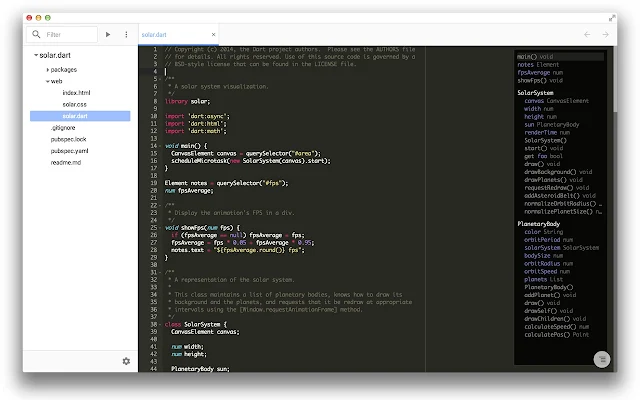
Chrome Dev Editor (developer preview)

Chrome Dev Editor (CDE) is a developer tool for building apps on the Chrome platform - Chrome Apps and Web Apps. CDE has support for writing applications in JavaScript or Dart, and has Polymer templates to help you get started building your UI. CDE also has built-in support for Git.


Google I/O 2014 - How we built Chrome Dev Editor with the Chrome platform

Thursday, April 17, 2014

Remote control Windows from Ubuntu Linux with Chrome Remote Desktop

With Chrome Remote Desktop "Enable remote connection" on Windows PC (refer to the last post), you can remote control it from Linux PC with Chrome Remote Desktop.

Wednesday, April 16, 2014

Remote access shared computer using Chrome Remote Desktop app on Android

[Updated@2015-09-09: check the updated post "Remote control Windows 10 from Android using Chrome Remote Desktop"]

The video show how to setup Chrome Remote Desktop on shared computer (running Windows 8.1) to enable remote access with PIN. Then you can control your computer remotely using Chrome Remote Desktop App on Android device.


In shared computer, Windows 8.1 in this example:
  • You need to log-in with a Google account.
  • Install Chrome Remote Desktop in Google Chrome.
  • Run the Chrome Remote Desktop App in Chrome's App pane.
  • Click the Get Started button in "My Computer" box.
  • Click "Enable remote connection".
  • Enter and re-enter the PIN you want, then OK.
  • You will be ask to grant permission by Windows.
  • Your computer, win-8b in this example, will be shown in "My Computer" box.
In Android:
  • Simple install Chrome Remote Desktop App.
  • Run it and select the same Google account in computer side.
  • You can see the computer, win-8b, in the list.

The following video show remote control shared PC from Android Phone. In this example, the Android phone connect Internet using 3G network. The shared PC running Windows 8.1, with Chrome Remote Desktop installed and setup "Enable remote connection", power-on with internet connection (via home network), even have not log-in Windows session, no any port forwarding setting on router. 


You can also access your shared Windows from Ubuntu Linux, read next post "Remote control Windows from Ubuntu Linux with Chrome Remote Desktop".

Related: Share computer desktop with Chrome Remote Desktop


Share computer desktop with Chrome Remote Desktop

Chrome Remote Desktop allows users to remotely access another computer through Chrome browser or a Chromebook.  Computers can be made available on an short-term basis for scenarios such as ad hoc remote support, or on a more long-term basis for remote access to your applications and files.  All connections are fully secured.

Chrome Remote Desktop is fully cross-platform.  Provide remote assistance to Windows, Mac and Linux users, or access your Windows (XP and above) and Mac (OS X 10.6 and above) desktops at any time, all from the Chrome browser on virtually any device, including Chromebooks.

This video show installation and setup Chrome Remote Desktop on Windows 8.1 to be shared. And install and setup on Ubuntu to access the shared Windows desktop.


Related: Access shared computer using Chrome Remote Desktop app on Android

Sunday, February 16, 2014

How Chrome on KitKat support HTML5

It's the build-in Chrome browser of Nexus 7 (1st generation) running Android 4.4.2 KitKat, visit html5test.com to measure how it support HTML5, and also compare with other browsers.

Wednesday, January 29, 2014

Build native mobile applications using HTML, CSS and JavaScript

Google introduce early developer preview of a toolchain to build native mobile apps using HTML, CSS and JavaScript. The toolchain based on Apache Cordova, an open-source mobile development framework.


The toolchain wraps your Chrome App with a native application shell and enables you to distribute your app via Google Play and the Apple App Store. We provide a simple developer workflow for packaging a Chrome App natively for mobile platforms. You can run your Chrome App on a device or emulator using the command-line or an IDE. Alternatively, you can use the Chrome Apps Developer Tool to run your app on an Android device without the need to install an IDE or the mobile platform’s SDK.

Soure: Chromium Blog: Run Chrome Apps on mobile using Apache Cordova