Last post demonstrate the Android Bluetooth Le Gatt example code with Arduino/Genuino 101. This post start to (TRY to) implement my own Bluetooth LE Gatt Example, step-by-step. The aim of the examples (in coming series) are scan BLE device, find and link with specified device Genuino 101 (programmed with "LEDCB", refer previous post), and read and write characteristic of the device to turn ON/OFF the Genuino 101 on-board LED.
In this first step, create a new project in Android Studio, named AndroidBleGatt.
In my example (in coming post) I will scan LE device using BluetoothLeScanner (Added in API level 21) instead of calling deprecated startLeScan() and stopLeScan() methods as in the BluetoothLeGatt example, so specify the Min Sdk Version of API 21.
Edit AndroidManifest.xml to add uses-feature of "android.hardware.bluetooth_le", uses-permission of "android.permission.BLUETOOTH", "android.permission.BLUETOOTH_ADMIN" and "android.permission.ACCESS_COARSE_LOCATION".
This post show how to run the Android Bluetooth Le Gatt example Code to link with Arduino/Genuino 101.
The Arduino/Genuino 101 board contains the Intel® Curie™ Module. The 101 adds Bluetooth Low Energy capabilities and has an on-board 6-axis accelerometer/gyroscope, providing exciting opportunities for building creative projects in the connected world. More information about the technical specifications and documentation can be found on the Arduino/Genuino 101 main page.
In Arduino/Genuino 101 board, program with example:
> File > Examples > CurieBLE > CallbackLED
This example setup Arduino/Genuino 101 as Bluetooth LE device (named "LEDCB") with service with UUID "19B10000-E8F2-537E-4F6C-D104768A1214" and create switch characteristic allowing remote device to read and write, with UUID "19B10001-E8F2-537E-4F6C-D104768A1214". We need the UUIDs in future examples.
So I copy here for future reference:
/*
  Copyright (c) 2015 Intel Corporation. All rights reserved.

  This library is free software; you can redistribute it and/or
  modify it under the terms of the GNU Lesser General Public
  License as published by the Free Software Foundation; either
  version 2.1 of the License, or (at your option) any later version.

  This library is distributed in the hope that it will be useful,
  but WITHOUT ANY WARRANTY; without even the implied warranty of
  MERCHANTABILITY or FITNESS FOR A PARTICULAR PURPOSE. See the GNU
  Lesser General Public License for more details.

  You should have received a copy of the GNU Lesser General Public
  License along with this library; if not, write to the Free Software
  Foundation, Inc., 51 Franklin Street, Fifth Floor, Boston, MA 02110-
  1301 USA
*/


#include <CurieBLE.h>

const int ledPin = 13; // set ledPin to use on-board LED
BLEPeripheral blePeripheral; // create peripheral instance

BLEService ledService("19B10000-E8F2-537E-4F6C-D104768A1214"); // create service

// create switch characteristic and allow remote device to read and write
BLECharCharacteristic switchChar("19B10001-E8F2-537E-4F6C-D104768A1214", BLERead | BLEWrite);

void setup() {
  Serial.begin(9600);
  pinMode(ledPin, OUTPUT); // use the LED on pin 13 as an output

  // set the local name peripheral advertises
  blePeripheral.setLocalName("LEDCB");
  // set the UUID for the service this peripheral advertises
  blePeripheral.setAdvertisedServiceUuid(ledService.uuid());

  // add service and characteristic
  blePeripheral.addAttribute(ledService);
  blePeripheral.addAttribute(switchChar);

  // assign event handlers for connected, disconnected to peripheral
  blePeripheral.setEventHandler(BLEConnected, blePeripheralConnectHandler);
  blePeripheral.setEventHandler(BLEDisconnected, blePeripheralDisconnectHandler);

  // assign event handlers for characteristic
  switchChar.setEventHandler(BLEWritten, switchCharacteristicWritten);
// set an initial value for the characteristic
  switchChar.setValue(0);

  // advertise the service
  blePeripheral.begin();
  Serial.println(("Bluetooth device active, waiting for connections..."));
}

void loop() {
  // poll peripheral
  blePeripheral.poll();
}

void blePeripheralConnectHandler(BLECentral& central) {
  // central connected event handler
  Serial.print("Connected event, central: ");
  Serial.println(central.address());
}

void blePeripheralDisconnectHandler(BLECentral& central) {
  // central disconnected event handler
  Serial.print("Disconnected event, central: ");
  Serial.println(central.address());
}

void switchCharacteristicWritten(BLECentral& central, BLECharacteristic& characteristic) {
  // central wrote new value to characteristic, update LED
  Serial.print("Characteristic event, written: ");

  if (switchChar.value()) {
    Serial.println("LED on");
    digitalWrite(ledPin, HIGH);
  } else {
    Serial.println("LED off");
    digitalWrite(ledPin, LOW);
  }
}
In Android side, load with example code of Bluetooth Le Gatt:
How it run:
This demo haven't show any real function indeed. In coming posts, I will TRY to implement my own example app (with re-using part of the Bluetooth Le Gatt example) to control and read state from Genuino 101. Currently, I don't know how much I can.
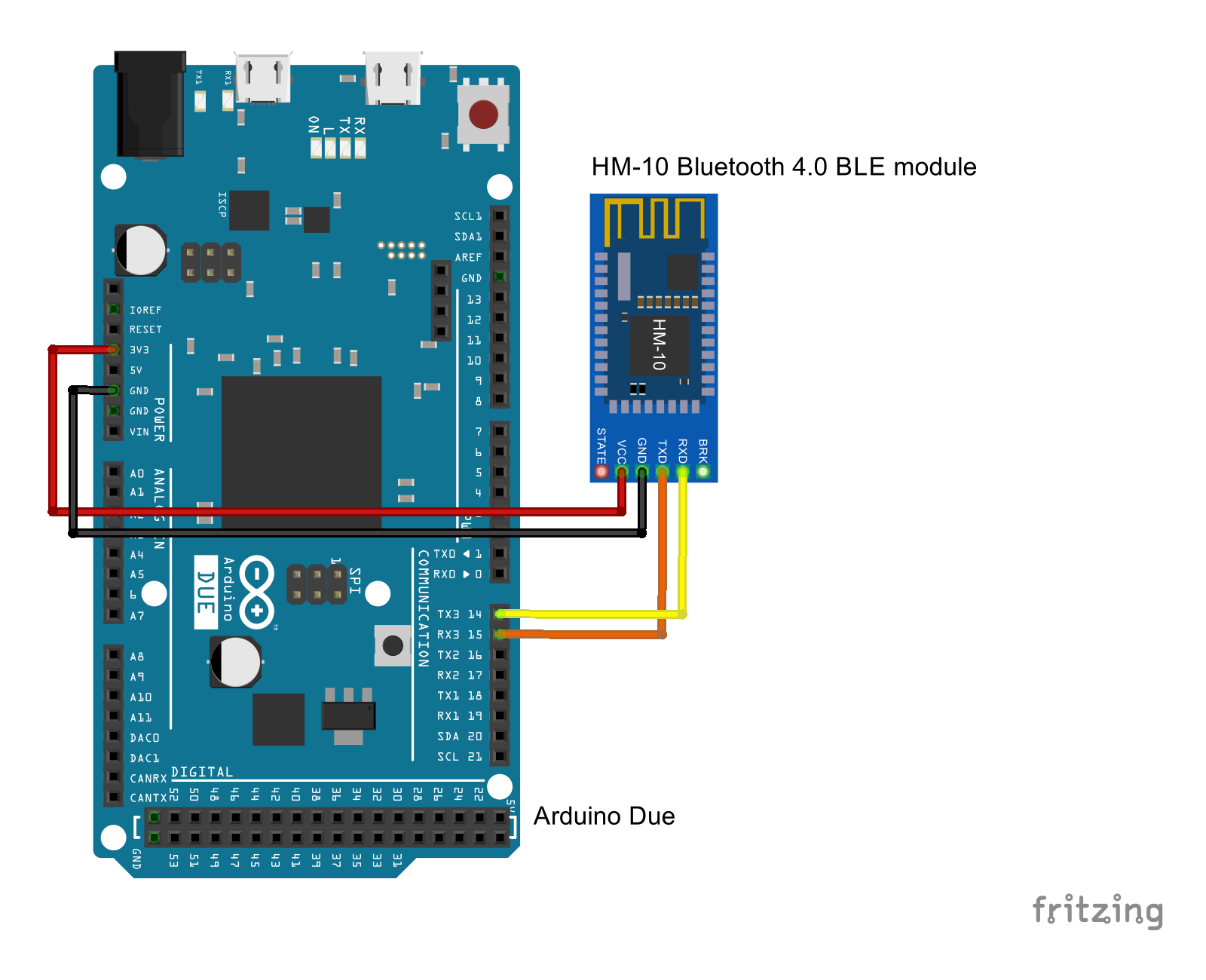
Here we will send dummy data of Heart Rate Measurement profile by Arduino Due + HM-10.
First of all, edit BluetoothLeService.java to resume original handling for Heart Rate Measurement profile:
/*
* Copyright (C) 2013 The Android Open Source Project
*
* Licensed under the Apache License, Version 2.0 (the "License");
* you may not use this file except in compliance with the License.
* You may obtain a copy of the License at
*
* http://www.apache.org/licenses/LICENSE-2.0
*
* Unless required by applicable law or agreed to in writing, software
* distributed under the License is distributed on an "AS IS" BASIS,
* WITHOUT WARRANTIES OR CONDITIONS OF ANY KIND, either express or implied.
* See the License for the specific language governing permissions and
* limitations under the License.
*/
package com.example.android.bluetoothlegatt;
import android.app.Service;
import android.bluetooth.BluetoothAdapter;
import android.bluetooth.BluetoothDevice;
import android.bluetooth.BluetoothGatt;
import android.bluetooth.BluetoothGattCallback;
import android.bluetooth.BluetoothGattCharacteristic;
import android.bluetooth.BluetoothGattDescriptor;
import android.bluetooth.BluetoothGattService;
import android.bluetooth.BluetoothManager;
import android.bluetooth.BluetoothProfile;
import android.content.Context;
import android.content.Intent;
import android.os.Binder;
import android.os.IBinder;
import android.util.Log;
import java.util.List;
import java.util.UUID;
/**
* Service for managing connection and data communication with a GATT server hosted on a
* given Bluetooth LE device.
*/
public class BluetoothLeService extends Service {
private final static String TAG = BluetoothLeService.class.getSimpleName();
private BluetoothManager mBluetoothManager;
private BluetoothAdapter mBluetoothAdapter;
private String mBluetoothDeviceAddress;
private BluetoothGatt mBluetoothGatt;
private int mConnectionState = STATE_DISCONNECTED;
private static final int STATE_DISCONNECTED = 0;
private static final int STATE_CONNECTING = 1;
private static final int STATE_CONNECTED = 2;
public final static String ACTION_GATT_CONNECTED =
"com.example.bluetooth.le.ACTION_GATT_CONNECTED";
public final static String ACTION_GATT_DISCONNECTED =
"com.example.bluetooth.le.ACTION_GATT_DISCONNECTED";
public final static String ACTION_GATT_SERVICES_DISCOVERED =
"com.example.bluetooth.le.ACTION_GATT_SERVICES_DISCOVERED";
public final static String ACTION_DATA_AVAILABLE =
"com.example.bluetooth.le.ACTION_DATA_AVAILABLE";
public final static String EXTRA_DATA =
"com.example.bluetooth.le.EXTRA_DATA";
public final static UUID UUID_HEART_RATE_MEASUREMENT =
UUID.fromString(SampleGattAttributes.HM_10);
// Implements callback methods for GATT events that the app cares about. For example,
// connection change and services discovered.
private final BluetoothGattCallback mGattCallback = new BluetoothGattCallback() {
@Override
public void onConnectionStateChange(BluetoothGatt gatt, int status, int newState) {
String intentAction;
if (newState == BluetoothProfile.STATE_CONNECTED) {
intentAction = ACTION_GATT_CONNECTED;
mConnectionState = STATE_CONNECTED;
broadcastUpdate(intentAction);
Log.i(TAG, "Connected to GATT server.");
// Attempts to discover services after successful connection.
Log.i(TAG, "Attempting to start service discovery:" +
mBluetoothGatt.discoverServices());
} else if (newState == BluetoothProfile.STATE_DISCONNECTED) {
intentAction = ACTION_GATT_DISCONNECTED;
mConnectionState = STATE_DISCONNECTED;
Log.i(TAG, "Disconnected from GATT server.");
broadcastUpdate(intentAction);
}
}
@Override
public void onServicesDiscovered(BluetoothGatt gatt, int status) {
if (status == BluetoothGatt.GATT_SUCCESS) {
broadcastUpdate(ACTION_GATT_SERVICES_DISCOVERED);
} else {
Log.w(TAG, "onServicesDiscovered received: " + status);
}
}
@Override
public void onCharacteristicRead(BluetoothGatt gatt,
BluetoothGattCharacteristic characteristic,
int status) {
if (status == BluetoothGatt.GATT_SUCCESS) {
broadcastUpdate(ACTION_DATA_AVAILABLE, characteristic);
}
}
@Override
public void onCharacteristicChanged(BluetoothGatt gatt,
BluetoothGattCharacteristic characteristic) {
broadcastUpdate(ACTION_DATA_AVAILABLE, characteristic);
}
};
private void broadcastUpdate(final String action) {
final Intent intent = new Intent(action);
sendBroadcast(intent);
}
private void broadcastUpdate(final String action,
final BluetoothGattCharacteristic characteristic) {
final Intent intent = new Intent(action);
// This is special handling for the Heart Rate Measurement profile. Data parsing is
// carried out as per profile specifications:
// http://developer.bluetooth.org/gatt/characteristics/Pages/CharacteristicViewer.aspx?u=org.bluetooth.characteristic.heart_rate_measurement.xml
if (UUID_HEART_RATE_MEASUREMENT.equals(characteristic.getUuid())) {
int flag = characteristic.getProperties();
int format = -1;
if ((flag & 0x01) != 0) {
format = BluetoothGattCharacteristic.FORMAT_UINT16;
Log.d(TAG, "Heart rate format UINT16.");
} else {
format = BluetoothGattCharacteristic.FORMAT_UINT8;
Log.d(TAG, "Heart rate format UINT8.");
}
final int heartRate = characteristic.getIntValue(format, 1);
Log.d(TAG, String.format("Received heart rate: %d", heartRate));
intent.putExtra(EXTRA_DATA, String.valueOf(heartRate));
} else {
// For all other profiles, writes the data formatted in HEX.
final byte[] data = characteristic.getValue();
if (data != null && data.length > 0) {
final StringBuilder stringBuilder = new StringBuilder(data.length);
for(byte byteChar : data)
stringBuilder.append(String.format("%02X ", byteChar));
intent.putExtra(EXTRA_DATA, new String(data) + "\n" + stringBuilder.toString());
}
}/*
Log.v("AndroidLE", "broadcastUpdate()");
final byte[] data = characteristic.getValue();
Log.v("AndroidLE", "data.length: " + data.length);
if (data != null && data.length > 0) {
final StringBuilder stringBuilder = new StringBuilder(data.length);
for(byte byteChar : data) {
stringBuilder.append(String.format("%02X ", byteChar));
Log.v("AndroidLE", String.format("%02X ", byteChar));
}
intent.putExtra(EXTRA_DATA, new String(data) + "\n" + stringBuilder.toString());
}
*/
sendBroadcast(intent);
}
public class LocalBinder extends Binder {
BluetoothLeService getService() {
return BluetoothLeService.this;
}
}
@Override
public IBinder onBind(Intent intent) {
return mBinder;
}
@Override
public boolean onUnbind(Intent intent) {
// After using a given device, you should make sure that BluetoothGatt.close() is called
// such that resources are cleaned up properly. In this particular example, close() is
// invoked when the UI is disconnected from the Service.
close();
return super.onUnbind(intent);
}
private final IBinder mBinder = new LocalBinder();
/**
* Initializes a reference to the local Bluetooth adapter.
*
* @return Return true if the initialization is successful.
*/
public boolean initialize() {
// For API level 18 and above, get a reference to BluetoothAdapter through
// BluetoothManager.
if (mBluetoothManager == null) {
mBluetoothManager = (BluetoothManager) getSystemService(Context.BLUETOOTH_SERVICE);
if (mBluetoothManager == null) {
Log.e(TAG, "Unable to initialize BluetoothManager.");
return false;
}
}
mBluetoothAdapter = mBluetoothManager.getAdapter();
if (mBluetoothAdapter == null) {
Log.e(TAG, "Unable to obtain a BluetoothAdapter.");
return false;
}
return true;
}
/**
* Connects to the GATT server hosted on the Bluetooth LE device.
*
* @param address The device address of the destination device.
*
* @return Return true if the connection is initiated successfully. The connection result
* is reported asynchronously through the
* {@code BluetoothGattCallback#onConnectionStateChange(android.bluetooth.BluetoothGatt, int, int)}
* callback.
*/
public boolean connect(final String address) {
if (mBluetoothAdapter == null || address == null) {
Log.w(TAG, "BluetoothAdapter not initialized or unspecified address.");
return false;
}
// Previously connected device. Try to reconnect.
if (mBluetoothDeviceAddress != null && address.equals(mBluetoothDeviceAddress)
&& mBluetoothGatt != null) {
Log.d(TAG, "Trying to use an existing mBluetoothGatt for connection.");
if (mBluetoothGatt.connect()) {
mConnectionState = STATE_CONNECTING;
return true;
} else {
return false;
}
}
final BluetoothDevice device = mBluetoothAdapter.getRemoteDevice(address);
if (device == null) {
Log.w(TAG, "Device not found. Unable to connect.");
return false;
}
// We want to directly connect to the device, so we are setting the autoConnect
// parameter to false.
mBluetoothGatt = device.connectGatt(this, false, mGattCallback);
Log.d(TAG, "Trying to create a new connection.");
mBluetoothDeviceAddress = address;
mConnectionState = STATE_CONNECTING;
return true;
}
/**
* Disconnects an existing connection or cancel a pending connection. The disconnection result
* is reported asynchronously through the
* {@code BluetoothGattCallback#onConnectionStateChange(android.bluetooth.BluetoothGatt, int, int)}
* callback.
*/
public void disconnect() {
if (mBluetoothAdapter == null || mBluetoothGatt == null) {
Log.w(TAG, "BluetoothAdapter not initialized");
return;
}
mBluetoothGatt.disconnect();
}
/**
* After using a given BLE device, the app must call this method to ensure resources are
* released properly.
*/
public void close() {
if (mBluetoothGatt == null) {
return;
}
mBluetoothGatt.close();
mBluetoothGatt = null;
}
/**
* Request a read on a given {@code BluetoothGattCharacteristic}. The read result is reported
* asynchronously through the {@code BluetoothGattCallback#onCharacteristicRead(android.bluetooth.BluetoothGatt, android.bluetooth.BluetoothGattCharacteristic, int)}
* callback.
*
* @param characteristic The characteristic to read from.
*/
public void readCharacteristic(BluetoothGattCharacteristic characteristic) {
if (mBluetoothAdapter == null || mBluetoothGatt == null) {
Log.w(TAG, "BluetoothAdapter not initialized");
return;
}
mBluetoothGatt.readCharacteristic(characteristic);
}
/**
* Enables or disables notification on a give characteristic.
*
* @param characteristic Characteristic to act on.
* @param enabled If true, enable notification. False otherwise.
*/
public void setCharacteristicNotification(BluetoothGattCharacteristic characteristic,
boolean enabled) {
if (mBluetoothAdapter == null || mBluetoothGatt == null) {
Log.w(TAG, "BluetoothAdapter not initialized");
return;
}
mBluetoothGatt.setCharacteristicNotification(characteristic, enabled);
// This is specific to Heart Rate Measurement.
if (UUID_HEART_RATE_MEASUREMENT.equals(characteristic.getUuid())) {
BluetoothGattDescriptor descriptor = characteristic.getDescriptor(
UUID.fromString(SampleGattAttributes.CLIENT_CHARACTERISTIC_CONFIG));
descriptor.setValue(BluetoothGattDescriptor.ENABLE_NOTIFICATION_VALUE);
mBluetoothGatt.writeDescriptor(descriptor);
}
}
/**
* Retrieves a list of supported GATT services on the connected device. This should be
* invoked only after {@code BluetoothGatt#discoverServices()} completes successfully.
*
* @return A {@code List} of supported services.
*/
public List<BluetoothGattService> getSupportedGattServices() {
if (mBluetoothGatt == null) return null;
return mBluetoothGatt.getServices();
}
}
Connect Arduino Due and HM-10:
HM-10 VCC - Arduino Due 3.3V
HM-10 GND - Arduino Due GND
HM-10 Tx - Arduino Due Rx
HM-10 Rx - Arduino Due Tx
Program on Arduino Due, DueSimHeartRate.ino. It only send dummy heart rate data to serial port.
int LED = 13;
boolean LEDst = false;

byte c;

void setup() {
  Serial3.begin(9600);
  pinMode(LED, OUTPUT);
  digitalWrite(LED, LEDst);
}

void loop() {
  delay(1000);
  c = (byte)0x00;
  Serial3.write(c);
  c = (byte)80;
  Serial3.write(c);

  delay(1000);
  c = (byte)0x00;
  Serial3.write(c);
  c = (byte)81;
  Serial3.write(c);

  delay(10);
  c = (byte)0x00;
  Serial3.write(c);
  c = (byte)82;
  Serial3.write(c);

  ToggleLED();
}

void ToggleLED(){
  digitalWrite(LED, LEDst = !LEDst);
}
According to the selling, AT-09 compatible with HM-10 (pin-to-pin NOT compatible). So the modified BluetoothLeGatt sample can connect to AT-09 also.
In my test, I tried to send AT command to AT-09 via FTDI adapter, but no respond returned! Actually I haven't received anything from AT-09/FTDI. It may be something wrong on my AT-09 sample, or on AT-09 TX - FTDI Adapter RX path, or may be somethong wrong on me!
Updated@2016-06-20:
According to Anonymous comment: AT-09 is actually BLE-CC41-A module. They need {CR}{LF} after AT command.
Edit SampleGattAttributes.java of BluetoothLeGatt sample to match 0xffe0 and 0xff1, and correct BluetoothLeService.java accordingly. Now, the sample app can recognize HM-10.
This video show how:
SampleGattAttributes.java
/*
 * Copyright (C) 2013 The Android Open Source Project
 *
 * Licensed under the Apache License, Version 2.0 (the "License");
 * you may not use this file except in compliance with the License.
 * You may obtain a copy of the License at
 *
 *      http://www.apache.org/licenses/LICENSE-2.0
 *
 * Unless required by applicable law or agreed to in writing, software
 * distributed under the License is distributed on an "AS IS" BASIS,
 * WITHOUT WARRANTIES OR CONDITIONS OF ANY KIND, either express or implied.
 * See the License for the specific language governing permissions and
 * limitations under the License.
 */

package com.example.android.bluetoothlegatt;

import java.util.HashMap;

/**
 * This class includes a small subset of standard GATT attributes for demonstration purposes.
 */
public class SampleGattAttributes {
    private static HashMap<String, String> attributes = new HashMap();
    public static String HM_10 = "0000ffe1-0000-1000-8000-00805f9b34fb";
    public static String CLIENT_CHARACTERISTIC_CONFIG = "00002902-0000-1000-8000-00805f9b34fb";

    static {
        // Sample Services.
        attributes.put("0000ffe0-0000-1000-8000-00805f9b34fb", "HM-10 Service");
        attributes.put("0000180a-0000-1000-8000-00805f9b34fb", "Device Information Service");
        // Sample Characteristics.
        attributes.put(HM_10, "HM-10 Module");
        attributes.put("00002a29-0000-1000-8000-00805f9b34fb", "Manufacturer Name String");
    }

    public static String lookup(String uuid, String defaultName) {
        String name = attributes.get(uuid);
        return name == null ? defaultName : name;
    }
}
BluetoothLeService.java
    public final static UUID UUID_HEART_RATE_MEASUREMENT =
            UUID.fromString(SampleGattAttributes.HM_10);
In the last step in this post, I want to make the BluetoothLeGatt app to receive something from HM-10.
In HM-10 side, FTDI USB-Serial adapter is needed to connect HM-10 to PC via USB/Serial. Such that I can enter something in PC, using Arduino Serial Monitor. Refer Arduino-er: Test HM-10 Bluetooth 4.0 BLE module with FTDI adapter, how to connect PC, FTDI USB-Serial adapter and HM-10.
The original BluetoothLeGatt example target for the Heart Rate Measurement profile. In our demo, we target to receive simple serial data, so modify to by-pass the Heart Rate Measurement profile handling.
Edit broadcastUpdate(final String action, final BluetoothGattCharacteristic characteristic) method of BluetoothLeService.java.
This video show how to:
BluetoothLeService.java
/*
* Copyright (C) 2013 The Android Open Source Project
*
* Licensed under the Apache License, Version 2.0 (the "License");
* you may not use this file except in compliance with the License.
* You may obtain a copy of the License at
*
* http://www.apache.org/licenses/LICENSE-2.0
*
* Unless required by applicable law or agreed to in writing, software
* distributed under the License is distributed on an "AS IS" BASIS,
* WITHOUT WARRANTIES OR CONDITIONS OF ANY KIND, either express or implied.
* See the License for the specific language governing permissions and
* limitations under the License.
*/
package com.example.android.bluetoothlegatt;
import android.app.Service;
import android.bluetooth.BluetoothAdapter;
import android.bluetooth.BluetoothDevice;
import android.bluetooth.BluetoothGatt;
import android.bluetooth.BluetoothGattCallback;
import android.bluetooth.BluetoothGattCharacteristic;
import android.bluetooth.BluetoothGattDescriptor;
import android.bluetooth.BluetoothGattService;
import android.bluetooth.BluetoothManager;
import android.bluetooth.BluetoothProfile;
import android.content.Context;
import android.content.Intent;
import android.os.Binder;
import android.os.IBinder;
import android.util.Log;
import java.util.List;
import java.util.UUID;
/**
* Service for managing connection and data communication with a GATT server hosted on a
* given Bluetooth LE device.
*/
public class BluetoothLeService extends Service {
private final static String TAG = BluetoothLeService.class.getSimpleName();
private BluetoothManager mBluetoothManager;
private BluetoothAdapter mBluetoothAdapter;
private String mBluetoothDeviceAddress;
private BluetoothGatt mBluetoothGatt;
private int mConnectionState = STATE_DISCONNECTED;
private static final int STATE_DISCONNECTED = 0;
private static final int STATE_CONNECTING = 1;
private static final int STATE_CONNECTED = 2;
public final static String ACTION_GATT_CONNECTED =
"com.example.bluetooth.le.ACTION_GATT_CONNECTED";
public final static String ACTION_GATT_DISCONNECTED =
"com.example.bluetooth.le.ACTION_GATT_DISCONNECTED";
public final static String ACTION_GATT_SERVICES_DISCOVERED =
"com.example.bluetooth.le.ACTION_GATT_SERVICES_DISCOVERED";
public final static String ACTION_DATA_AVAILABLE =
"com.example.bluetooth.le.ACTION_DATA_AVAILABLE";
public final static String EXTRA_DATA =
"com.example.bluetooth.le.EXTRA_DATA";
public final static UUID UUID_HEART_RATE_MEASUREMENT =
UUID.fromString(SampleGattAttributes.HM_10);
// Implements callback methods for GATT events that the app cares about. For example,
// connection change and services discovered.
private final BluetoothGattCallback mGattCallback = new BluetoothGattCallback() {
@Override
public void onConnectionStateChange(BluetoothGatt gatt, int status, int newState) {
String intentAction;
if (newState == BluetoothProfile.STATE_CONNECTED) {
intentAction = ACTION_GATT_CONNECTED;
mConnectionState = STATE_CONNECTED;
broadcastUpdate(intentAction);
Log.i(TAG, "Connected to GATT server.");
// Attempts to discover services after successful connection.
Log.i(TAG, "Attempting to start service discovery:" +
mBluetoothGatt.discoverServices());
} else if (newState == BluetoothProfile.STATE_DISCONNECTED) {
intentAction = ACTION_GATT_DISCONNECTED;
mConnectionState = STATE_DISCONNECTED;
Log.i(TAG, "Disconnected from GATT server.");
broadcastUpdate(intentAction);
}
}
@Override
public void onServicesDiscovered(BluetoothGatt gatt, int status) {
if (status == BluetoothGatt.GATT_SUCCESS) {
broadcastUpdate(ACTION_GATT_SERVICES_DISCOVERED);
} else {
Log.w(TAG, "onServicesDiscovered received: " + status);
}
}
@Override
public void onCharacteristicRead(BluetoothGatt gatt,
BluetoothGattCharacteristic characteristic,
int status) {
if (status == BluetoothGatt.GATT_SUCCESS) {
broadcastUpdate(ACTION_DATA_AVAILABLE, characteristic);
}
}
@Override
public void onCharacteristicChanged(BluetoothGatt gatt,
BluetoothGattCharacteristic characteristic) {
broadcastUpdate(ACTION_DATA_AVAILABLE, characteristic);
}
};
private void broadcastUpdate(final String action) {
final Intent intent = new Intent(action);
sendBroadcast(intent);
}
private void broadcastUpdate(final String action,
final BluetoothGattCharacteristic characteristic) {
final Intent intent = new Intent(action);
/*
// This is special handling for the Heart Rate Measurement profile. Data parsing is
// carried out as per profile specifications:
// http://developer.bluetooth.org/gatt/characteristics/Pages/CharacteristicViewer.aspx?u=org.bluetooth.characteristic.heart_rate_measurement.xml
if (UUID_HEART_RATE_MEASUREMENT.equals(characteristic.getUuid())) {
int flag = characteristic.getProperties();
int format = -1;
if ((flag & 0x01) != 0) {
format = BluetoothGattCharacteristic.FORMAT_UINT16;
Log.d(TAG, "Heart rate format UINT16.");
} else {
format = BluetoothGattCharacteristic.FORMAT_UINT8;
Log.d(TAG, "Heart rate format UINT8.");
}
final int heartRate = characteristic.getIntValue(format, 1);
Log.d(TAG, String.format("Received heart rate: %d", heartRate));
intent.putExtra(EXTRA_DATA, String.valueOf(heartRate));
} else {
// For all other profiles, writes the data formatted in HEX.
final byte[] data = characteristic.getValue();
if (data != null && data.length > 0) {
final StringBuilder stringBuilder = new StringBuilder(data.length);
for(byte byteChar : data)
stringBuilder.append(String.format("%02X ", byteChar));
intent.putExtra(EXTRA_DATA, new String(data) + "\n" + stringBuilder.toString());
}
}
*/Log.v("AndroidLE", "broadcastUpdate()");
final byte[] data = characteristic.getValue();
Log.v("AndroidLE", "data.length: " + data.length);
if (data != null && data.length > 0) {
final StringBuilder stringBuilder = new StringBuilder(data.length);
for(byte byteChar : data) {
stringBuilder.append(String.format("%02X ", byteChar));
Log.v("AndroidLE", String.format("%02X ", byteChar));
}
intent.putExtra(EXTRA_DATA, new String(data) + "\n" + stringBuilder.toString());
}
sendBroadcast(intent);
}
public class LocalBinder extends Binder {
BluetoothLeService getService() {
return BluetoothLeService.this;
}
}
@Override
public IBinder onBind(Intent intent) {
return mBinder;
}
@Override
public boolean onUnbind(Intent intent) {
// After using a given device, you should make sure that BluetoothGatt.close() is called
// such that resources are cleaned up properly. In this particular example, close() is
// invoked when the UI is disconnected from the Service.
close();
return super.onUnbind(intent);
}
private final IBinder mBinder = new LocalBinder();
/**
* Initializes a reference to the local Bluetooth adapter.
*
* @return Return true if the initialization is successful.
*/
public boolean initialize() {
// For API level 18 and above, get a reference to BluetoothAdapter through
// BluetoothManager.
if (mBluetoothManager == null) {
mBluetoothManager = (BluetoothManager) getSystemService(Context.BLUETOOTH_SERVICE);
if (mBluetoothManager == null) {
Log.e(TAG, "Unable to initialize BluetoothManager.");
return false;
}
}
mBluetoothAdapter = mBluetoothManager.getAdapter();
if (mBluetoothAdapter == null) {
Log.e(TAG, "Unable to obtain a BluetoothAdapter.");
return false;
}
return true;
}
/**
* Connects to the GATT server hosted on the Bluetooth LE device.
*
* @param address The device address of the destination device.
*
* @return Return true if the connection is initiated successfully. The connection result
* is reported asynchronously through the
* {@code BluetoothGattCallback#onConnectionStateChange(android.bluetooth.BluetoothGatt, int, int)}
* callback.
*/
public boolean connect(final String address) {
if (mBluetoothAdapter == null || address == null) {
Log.w(TAG, "BluetoothAdapter not initialized or unspecified address.");
return false;
}
// Previously connected device. Try to reconnect.
if (mBluetoothDeviceAddress != null && address.equals(mBluetoothDeviceAddress)
&& mBluetoothGatt != null) {
Log.d(TAG, "Trying to use an existing mBluetoothGatt for connection.");
if (mBluetoothGatt.connect()) {
mConnectionState = STATE_CONNECTING;
return true;
} else {
return false;
}
}
final BluetoothDevice device = mBluetoothAdapter.getRemoteDevice(address);
if (device == null) {
Log.w(TAG, "Device not found. Unable to connect.");
return false;
}
// We want to directly connect to the device, so we are setting the autoConnect
// parameter to false.
mBluetoothGatt = device.connectGatt(this, false, mGattCallback);
Log.d(TAG, "Trying to create a new connection.");
mBluetoothDeviceAddress = address;
mConnectionState = STATE_CONNECTING;
return true;
}
/**
* Disconnects an existing connection or cancel a pending connection. The disconnection result
* is reported asynchronously through the
* {@code BluetoothGattCallback#onConnectionStateChange(android.bluetooth.BluetoothGatt, int, int)}
* callback.
*/
public void disconnect() {
if (mBluetoothAdapter == null || mBluetoothGatt == null) {
Log.w(TAG, "BluetoothAdapter not initialized");
return;
}
mBluetoothGatt.disconnect();
}
/**
* After using a given BLE device, the app must call this method to ensure resources are
* released properly.
*/
public void close() {
if (mBluetoothGatt == null) {
return;
}
mBluetoothGatt.close();
mBluetoothGatt = null;
}
/**
* Request a read on a given {@code BluetoothGattCharacteristic}. The read result is reported
* asynchronously through the {@code BluetoothGattCallback#onCharacteristicRead(android.bluetooth.BluetoothGatt, android.bluetooth.BluetoothGattCharacteristic, int)}
* callback.
*
* @param characteristic The characteristic to read from.
*/
public void readCharacteristic(BluetoothGattCharacteristic characteristic) {
if (mBluetoothAdapter == null || mBluetoothGatt == null) {
Log.w(TAG, "BluetoothAdapter not initialized");
return;
}
mBluetoothGatt.readCharacteristic(characteristic);
}
/**
* Enables or disables notification on a give characteristic.
*
* @param characteristic Characteristic to act on.
* @param enabled If true, enable notification. False otherwise.
*/
public void setCharacteristicNotification(BluetoothGattCharacteristic characteristic,
boolean enabled) {
if (mBluetoothAdapter == null || mBluetoothGatt == null) {
Log.w(TAG, "BluetoothAdapter not initialized");
return;
}
mBluetoothGatt.setCharacteristicNotification(characteristic, enabled);
// This is specific to Heart Rate Measurement.
if (UUID_HEART_RATE_MEASUREMENT.equals(characteristic.getUuid())) {
BluetoothGattDescriptor descriptor = characteristic.getDescriptor(
UUID.fromString(SampleGattAttributes.CLIENT_CHARACTERISTIC_CONFIG));
descriptor.setValue(BluetoothGattDescriptor.ENABLE_NOTIFICATION_VALUE);
mBluetoothGatt.writeDescriptor(descriptor);
}
}
/**
* Retrieves a list of supported GATT services on the connected device. This should be
* invoked only after {@code BluetoothGatt#discoverServices()} completes successfully.
*
* @return A {@code List} of supported services.
*/
public List<BluetoothGattService> getSupportedGattServices() {
if (mBluetoothGatt == null) return null;
return mBluetoothGatt.getServices();
}
}
Android 4.3 (API Level 18) introduces built-in platform support for Bluetooth Low Energy in the central role and provides APIs that apps can use to discover devices, query for services, and read/write characteristics.
To check if your device support Bluetooth Low Energy programmically, check (getPackageManager().hasSystemFeature(PackageManager.FEATURE_BLUETOOTH_LE)).
Nexus 7, 1st gen, not support BlueTooth LE!
MK 908III Android mini PC support both Bluetooth and Bluetooth LE
package com.example.androidcheckbtle;

import android.support.v7.app.ActionBarActivity;
import android.content.pm.PackageManager;
import android.os.Build;
import android.os.Bundle;
import android.widget.TextView;

public class MainActivity extends ActionBarActivity {

 @Override
 protected void onCreate(Bundle savedInstanceState) {
  super.onCreate(savedInstanceState);
  setContentView(R.layout.activity_main);

  TextView textManufacturer = (TextView)findViewById(R.id.manufacturer);
  TextView textModel = (TextView)findViewById(R.id.model);
  TextView textSupportBT = (TextView)findViewById(R.id.supportbt);
  TextView textSupportBTLE = (TextView)findViewById(R.id.supportbtle);

  //Get brand, manufacturer and model of your device
  textManufacturer.setText(Build.BRAND + " : " + Build.MANUFACTURER);
  textModel.setText(Build.MODEL);

  //Check if your device support BlueTooth
  if (getPackageManager().hasSystemFeature(PackageManager.FEATURE_BLUETOOTH)){
   textSupportBT.setText("Support BLUETOOTH");
  }else{
   textSupportBT.setText("NOT Support BLUETOOTH");
  }

  //Check if your device support Bluetooth Low Energy
  if (getPackageManager().hasSystemFeature(PackageManager.FEATURE_BLUETOOTH_LE)){
   textSupportBTLE.setText("Support BLUETOOTH_LE");
  }else{
   textSupportBTLE.setText("NOT Support BLUETOOTH_LE");
  }
 }

}
Bluetooth Low Energy is an incredibly exciting technology with the promise of unlocking a myriad of use cases. This session will focus on new Bluetooth Low Energy features, including improved scanning and newly added support for peripheral mode, in Android.