Showing posts with label Visual Studio 2015. Show all posts

Saturday, September 12, 2015

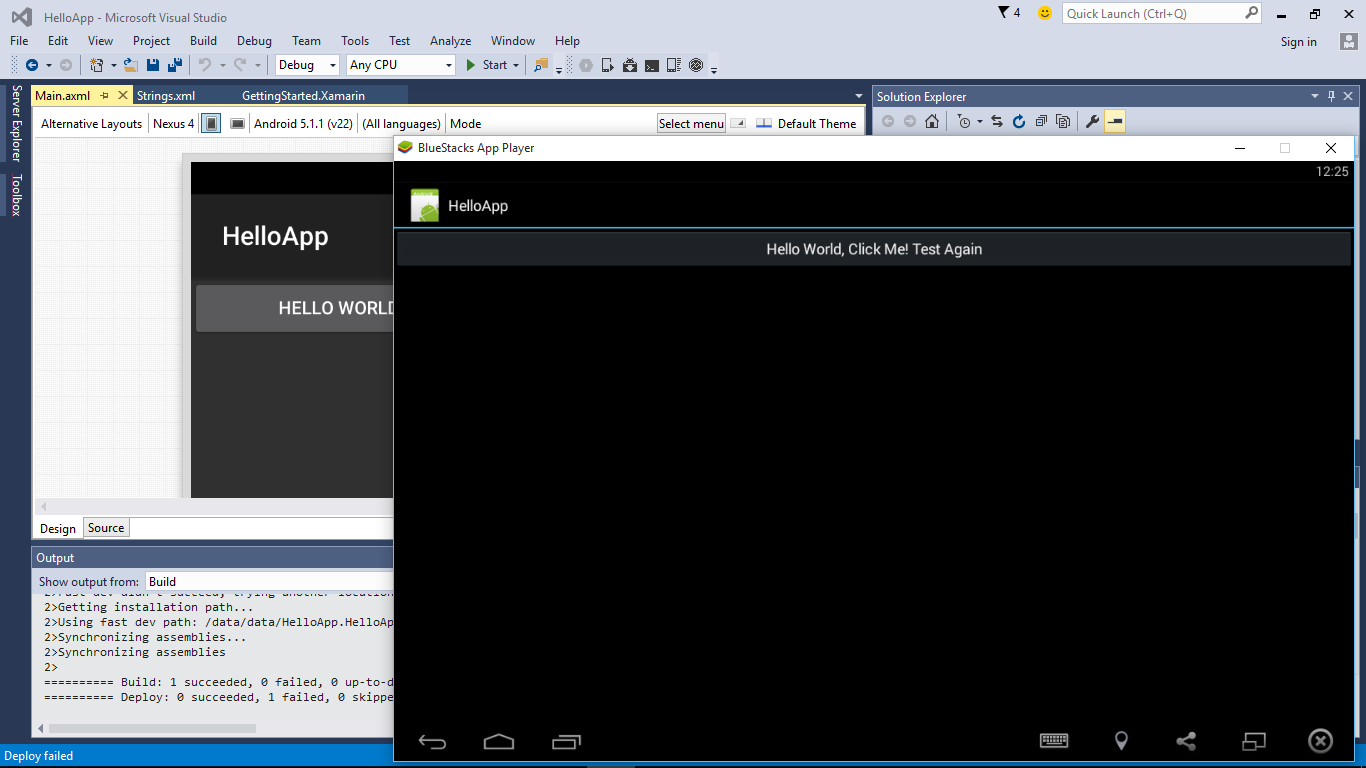
Run Visual Studio 2015 solution of Xamarin-Android App on BlueStacks App Player

VS2015 Hello World of Xamarin-Android App run on BlueStacks App Player
This video show how to create Xamarin-Android App with Visual Studio 2015 Community, and run it on BlueStacks App Player.


*REMARK*
When deploy to BlueStacks, Assembly synchronization error reported failed due to an error in FastDev assembly synchronization. MAY BE caused by I install both Visual Studio 2015 Community and Android Studio in the same PC, I don't know why! I still can skip the error and run the app.


Friday, September 4, 2015

Hello World Android App on Visual Studio 2015

This video show how to create Hello World in Visual Studio 2015, and run in Android AVD.


To Update Android SDK
click Tools > Android > Android SDK Manager...


Install Visual Studio 2015 Community on Windows 10 Home

Visual Studio 2015 Community is a Free, full-featured and extensible tool for developers building non-enterprise applications. (My Windows 10 is Home Edition, so not all features are supported; such as emulator)

Here how to install Visual Studio 2015 Community on Windows 10 Home:


~ Visual Studio Downloads


Next:
- how to create Hello World in Visual Studio 2015, and run in Android AVD, and Update Android SDK.
Run Visual Studio 2015 solution of Xamarin-Android App on BlueStacks App Player


On-line A Developer's Guide to Windows 10, by Microsoft Virtual Academy


A Developer's Guide to Windows 10

  • 1 | The Universal Windows Platform
  • 2 | XAML Controls in UWP
  • 3 | Windowing and In-App Navigation
  • 4 | Adaptive UI
  • 5 | Adaptive Code
  • 6 | Application Lifecycle
  • 7 | Improving XAML Performance
  • 8 | New Tooling in Visual Studio 2015
  • 9 | Microsoft Edge and the Web Platform
  • 10 | Improvements to XAML Data Binding
  • 11 | Background Execution
  • 12 | Building an Azure Back End
  • 13 | Live Tiles, Notifications, and Action Center
  • 14 | More Personal Computing
  • 15 | App-to-App Communication
  • 16 | App Services
  • 17 | Porting 8.1 Apps
  • 18 | Submitting Your App to the Store
  • Recommended Resources & Next Steps

Visit: https://www.microsoftvirtualacademy.com/en-US/training-courses/a-developer-s-guide-to-windows-10-12618

Saturday, August 29, 2015

Microsoft Visual Studio 2015 Unleashed (3rd Edition)

Microsoft Visual Studio 2015 Unleashed (3rd Edition)

Microsoft Visual Studio 2015 empowers you to write next-generation applications for any modern environment: mobile, web, cloud, universal Windows 10/8.x, database, and beyond. This end-to-end deep dive will help working developers squeeze maximum productivity out of Microsoft’s powerful new toolset.

The authors combine authoritative and detailed information about Microsoft’s latest IDE, with extensive insights and best practices drawn from decades of development experience. Developers will quickly get comfortable with Visual Studio 2015’s updated interface, master its new capabilities, leverage its extensive new support for open standards, and discover multiple opportunities to leverage its .NET 4.6 platform and language improvements.

By focusing entirely on Visual Studio 2015 Professional, the authors go deeper into Microsoft’s core product than ever before. You’ll find expert coverage of everything from debugging through deploying to Azure, IDE extension and automation through cross-platform mobile development. Throughout, this book’s focus is relentlessly practical: how to apply Microsoft’s tools to build better software, faster.

Detailed information on how to...
  • Master Visual Studio 2015’s updated interface and key tools: Solutions, Projects, Browsers, Explorers, Editors, and Designers to improve productivity
  • Develop robust cross-platform mobile apps for Windows, iOS, and Android using Apache Cordova templates for Visual Studio
  • Use the new ASP.NET 5 to build modern web solutions that run on Windows, Mac, or Linux
  • Develop Single Page Applications (SPAs) based on HTML5 and rich client-side JavaScript frameworks such as Knockout, AngularJS, Bootstrap, and more
  • Accelerate cloud development with the Azure SDK, QuickStart templates, and Azure management portal
  • Create mobile service solutions using ASP.NET Web API and WCF
  • Streamline data development across multiple platforms with Entity Framework 7
  • Develop modern Microsoft Office business applications
  • Perform robust, automated unit testing as you code, increasing your confidence in changes and refactoring
  • Extend the VS 2015 IDE and Code Editor by creating custom, productivity-enhancing solutions
Download all examples and source code presented in this book from informit.com/title/9780672337369 as they become available.
Free eBook: Visual Studio 2015 Succinctly

Description
Microsoft Visual Studio 2015 is the new version of the widely-used integrated development environment for building modern, high-quality applications for a number of platforms such as Windows, the web, the cloud, and mobile devices. In Visual Studio 2015 Succinctly, author Alessandro Del Sole explains how to take advantage of the most useful of these highly anticipated features. Topics include sharing code between different types of projects, new options for debugging and diagnostics, and improving productivity with other services in the Visual Studio ecosystem, such as NuGet and Azure. Changes to the code editor and XAML editor are also covered, as well as updates for mobile development in Visual Studio.

Table of Contents
Account Management Experience
Shared Projects
Code Editor Improvements
XAML Editor Improvements
IDE Customizations: Window Layout
Error List Revisited and Debugging Improvements
Managing NuGet Packages
Visual Studio 2015 for ASP.NET and Azure Chapter Prerequisites
Visual Studio 2015 for Mobile Development

Visit: https://www.syncfusion.com/resources/techportal/details/ebooks/visualstudio2015, register and download for FREE.

Sunday, January 4, 2015

Visual C++ for Cross Platform Mobile Development using Visual Studio 2015

In this video, Ankit Asthana shows you how to use Visual Studio 2015 to share, reuse, build, deploy, and debug your cross-platform mobile C/C++ code, including how to: Create projects from templates for Android Native Activity apps, or for shared code libraries that you can use on multiple platforms and in Xamarin hybrid apps. Use platform-specific IntelliSense to explore APIs and generate correct code for Android or Windows targets. Configure your build for x86 or ARM native platforms. Deploy your code to attached Android devices or use Microsoft's performant Android emulator for testing. Set breakpoints, watch variables, view the stack and step through code in the Visual Studio debugger. Share all but the most platform-specific code across multiple app platforms, and build them all with a single solution in Visual Studio. 

Visual C++ for Cross Platform Mobile Development using Visual Studio 2015

Visual Studio 2015 Emulator for Android

Visual Studio 2015 Emulator for Android


When developing for any platform, every developer needs a fast and reliable edit-compile-debug cycle. With Visual Studio 2015 Preview you can target Android and edit-compile-debug regardless of your choice of programming models: HTML/JavaScript with Cordova; C++; or C# with Xamarin. With all three of those choices, when you start debugging, you must first choose a target: a device, or an emulator. This video will provide an overview of Microsoft's emulator for Android specifically.